
Pillar 2: Tools
Accountable & Transparent
Listen to this chapter · 35 min, narrated by David Jenyns
“Tell me how you measure me, and I will tell you how I will behave.” — Eliyahu M. Goldratt, creator of the Theory of Constraints and author of The Goal
In 1989, Michael Jordan was already being called the greatest basketball player of all time. His aerial acrobatics and scoring ability were unprecedented. He was putting up incredible numbers. In one season he was averaging 37 points per game. But despite Jordan’s individual brilliance, the Chicago Bulls weren’t winning championships.
Everything changed when Phil Jackson became head coach. He introduced a new offensive system called the “triangle offense” that forced Jordan to trust his teammates more. At first, Jordan resisted. He’d grown used to taking on entire teams by himself. But Jackson convinced him that to reach the next level, he needed to empower his team.
What happened next was extraordinary to watch. Jordan started making different plays. He’d drive toward the basket, drawing defenders to him, then suddenly whip the ball to Scottie Pippen in the corner or fire a pass to John Paxson at the three-point line. These weren’t gentle passes; they were bullets, thrown with absolute conviction that his teammates would be exactly where they needed to be, ready to catch and shoot. And they were.
Because the triangle offense wasn’t just a collection of plays. It was a tool that created absolute clarity about where everyone should be and what they should be doing. It gave Jordan new options he’d never had before. He could now make no-look passes to Horace Grant under the basket because he knew, without even looking, exactly where Grant would be.
The results? Six NBA championships in eight years. Jordan didn’t just maintain his greatness: he elevated it. His scoring might have dropped slightly, but his assists went up, his teammates’ production soared and, most importantly, his team started winning at an unprecedented level.
Just like basketball, business is the ultimate team sport. You might have incredible talent in your organisation, but true success comes from getting everyone working together seamlessly. I see it all the time – businesses struggling not because they lack talent, but because they’re playing like a pre-1989 Bulls team. They have their Michael Jordans, but they’re trying to win championships through individual brilliance alone.
What makes a poorly performing team in the game of business? People working in silos, keeping their processes hidden in their own little black boxes. Sometimes it’s deliberate – they think keeping knowledge to themselves provides job security. Other times, it’s simply because it’s “how we’ve always done it”. Either way, these hidden pockets of information hurt the entire team’s performance.
By the nature of the task, documenting your systems will shine a light on this, making the invisible visible. But it is the tools that will truly create transparency and accountability, ensuring everyone knows exactly who’s doing what and by when. This clarity is what turns a collection of individual stars into champion-winning teams.
But before you think I’m going to give you specific tool or software recommendations, you can relax. In truth, those are just the details. And in reality, which tool you select is not what’s important here. Different industries use different tools, and different businesses and their teams will choose the software that is right for them.
What I am going to share goes deeper. We are going to look at what really needs to be in place to have teams operating at their highest level. Because when you get this right, when everyone has clarity about who is doing what, that is when business becomes a beautiful team sport.
The two key areas to focus on when you’re selecting your tools are transparency and accountability.
Think of transparency like putting your whole team in a glass-walled office. Everyone can see what everyone else is working on. There is nothing to hide, no secret projects, no mysterious priorities – just clarity about who is doing what and when it needs to be done. This visibility is not about micromanagement. It is about empowerment. When team members can see how their work connects to others, they naturally start finding ways to improve the whole system.
This transparency leads naturally to accountability. When work is visible, it automatically drives people to take ownership. Every team member becomes responsible for completing tasks, and it quickly becomes obvious if someone is letting the team down.
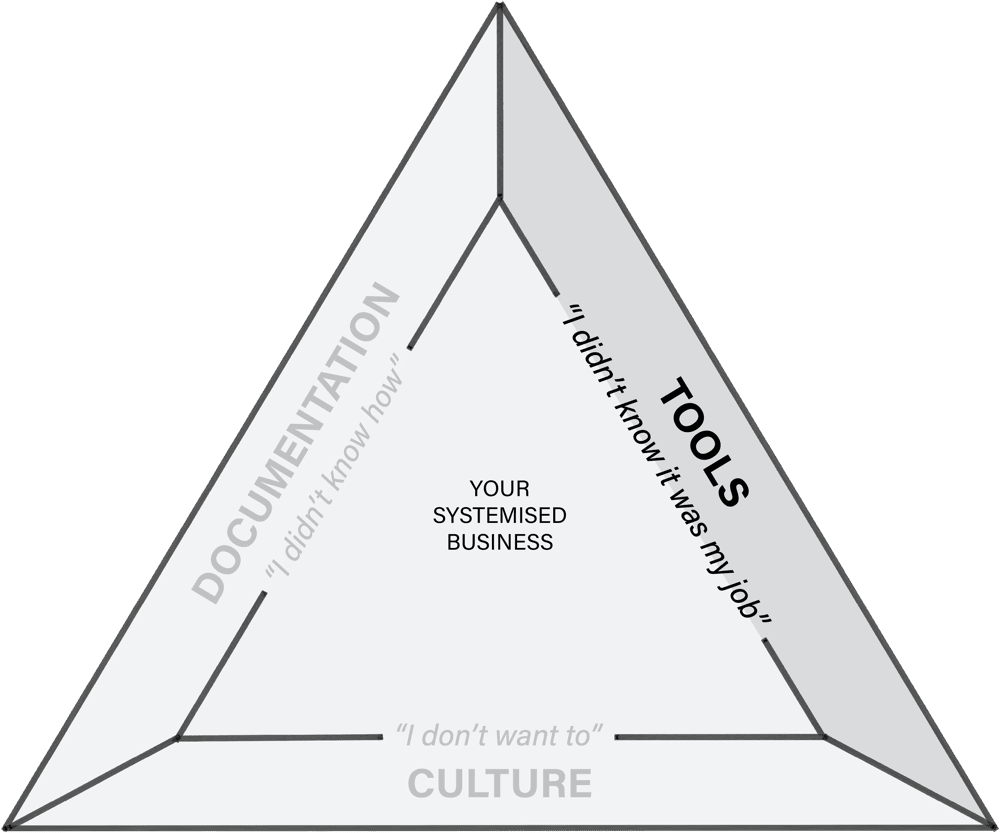
The magic happens at the intersection of documented processes and the right tools. Together, they eliminate those all-too-familiar excuses: “I didn’t know it was my job,” “I didn’t realise it had to be done by then,” or the classic “Oh, I forgot.” When expectations are visible to everyone, these excuses simply vanish. Clarity leaves no room for ambiguity.
So, what tools do you need to create transparency and accountability? There are countless tools out there promising to transform your business. But rather than getting lost in a sea of software options, let’s focus on the two types that matter most for systems-driven businesses: systems management and project management.
Systems management
You may have already given systems management software some thought when you worked through the previous section on documentation. This is simply the space where your documented systems are stored. It’s the central repository for the “how-to” knowledge within the business. It should be simple, centralised and easily accessible.
The secret to solving the “I didn’t know how” excuse is to ensure team members are never more than one click away from the process they need. When someone’s in the middle of a task and needs guidance, they shouldn’t have to hunt through folders or remember complex navigation paths. Every system should be instantly accessible right when and where it’s needed.
This might mean embedding links in task descriptions, sticking QR codes near equipment that links directly to the associated process or including direct links in calendar invites. The goal is to remove any friction between your team members and the information they need. When someone says “I couldn’t find the system,” that’s not their failure – it’s a sign your set-up needs improvement.
Most people get this wrong. You don’t need the fanciest software with the most features. In fact, chasing features often leads to complexity, and complexity is the enemy of adoption. What you need is simplicity and accessibility. Remember, the best system in the world is useless if your team can’t access it exactly when they need it.
One of the topics I have received some mixed feedback on was my recommendation in SYSTEMology to keep your systems management software separate from your project management software (which we’ll talk about shortly). And while there have been advancements with different tools, I still believe there are several compelling reasons to keep your systems documentation separate.
First, your documented systems are arguably your most valuable business asset. They capture years of experience, refinement and proven success. Housing them in dedicated software sends a clear message about their importance and ensures they receive the attention they deserve. It’s like keeping your family’s treasured recipes in a proper cookbook rather than scattered among grocery lists and Post-it notes.
Second, it establishes a single source of truth. When team members need to know how to do something, they know exactly where to look. No more hunting through project boards or wondering if they’re looking at the latest version. Everything is in one dedicated place, always current, always accessible.
Third, it protects and preserves your intellectual property. While project management tools are designed for temporary, task-focused information that comes and goes, your systems are permanent, valuable assets that need proper protection and management. When processes evolve (and they will), you can update them in one place, knowing that every linked reference points to the current version.
Think of it like this: your project management tool is your daily to-do list, while your systems management software is your business’s encyclopedia. They serve different purposes, and keeping them separate makes both more effective.
Project management
Once you have your systems management software in place, it’s time to tackle the second piece of the puzzle: project management. That is, how you will organise who is doing what by when.
If you’re already using project management software or some other tool to manage your tasks that you’re happy with, great. You can skip ahead to fine-tune your approach. But if not, I want to prepare you. This is going to be a significant change in how your business operates. It’s not just about adopting new software; it’s about transforming how your team communicates and coordinates work.
Here’s the thing, though. If you want to eliminate the “I didn’t know it was my job” excuse, project management software isn’t optional. It’s essential. You need a central place where everyone can see who’s doing what and when it needs to be done. Email chains, verbal instructions and sticky notes just won’t cut it anymore.
But timing is everything. If you’ve just started your systemisation journey, focus on your systems management first. Get your “how-to” knowledge documented and organised. Once that foundation is in place, you’ll be ready to tackle project management software, and your team will be more receptive to the change because they’ve already experienced the benefits of good systems.
When you’re ready to make the switch, good project management software should do several essential things. First and foremost, it needs to make task ownership crystal clear. There should never be any doubt about who’s responsible for what. It must allow you to set explicit deadlines and priorities so everyone knows what needs to be done first and when it’s due. All task-related communication should stay in one place, eliminating those endless email chains and scattered conversations.
It should seamlessly link to your documented systems, so team members are never more than a click away from the “how-to” guides they need. You don’t need anything fancy – just to be able to place a link in the task description.
And finally, it should make it easy to track progress, so everyone can see how projects are moving forward and where things might be getting stuck. This is what creates transparency and accountability.
Your documented systems are the “how” of your business, while project management is the “who”, “what” and “when”. Together, they go a long way to eliminating the two biggest excuses that hold businesses back: “I didn’t know how” and “I didn’t know it was my job.”
Setting up your software
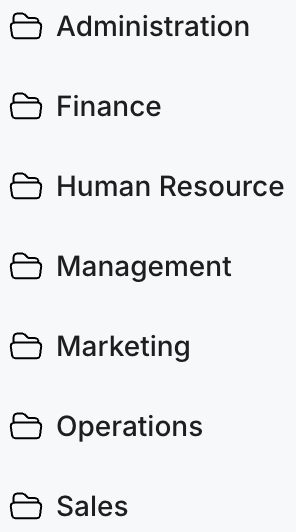
Let’s briefly talk about how to organise your documented systems. You want to organise everything so there’s a logical structure, making it easy to find things when they’re needed. The simplest approach is to create folders in your systems management software that match your core departments, e.g. Marketing, Sales, Operations, Finance, HR and Management. You can then use subfolders underneath those, if needed, for further sorting.
It may look a little bit like this:
That looks easy enough! Now, let’s combine it with your project management software. Building on this same foundation, we can add one more dimension: time.
Obviously every project management tool is a little different, but try to replicate the same departmental structure with separate areas for each department. Next, within those areas, look to organise tasks by their cadence (i.e. triggered, daily, weekly, monthly, quarterly, annually). This is the same thinking we used earlier when we completed your MVS. Think of it like creating a rhythm for your business. All you’re looking to do is transfer that into your project management software.
Here’s an example of what it might look like in your marketing department:
- Triggered tasks: new lead follow-up · social media comment responses · website enquiry handling
- Daily tasks: social media engagement · email inbox management · lead qualification
- Weekly tasks: performance metrics review · content calendar updates · team huddles
- Monthly tasks: campaign reporting · budget review · strategy adjustments
- Quarterly tasks: major campaign planning
- Annual tasks: strategic planning · year in review
Clearly I’ve gone a step beyond the prescribed seven systems per department as part of the MVS, but I wanted the example to be crystal clear. By organising tasks this way, you create natural cycles of work. Be sure to assign the team member who is responsible for each task so everyone knows what’s coming up. No more tasks falling through the cracks or last-minute scrambles to meet deadlines.
And here’s where everything connects beautifully. Each task in your project management software should link directly to its corresponding system in your systems management software. For instance, when someone gets assigned “New Lead Follow-Up”, they should be able to click straight through to the documented process explaining exactly how to handle new leads.
Remember, you don’t need to build this all at once. Pick a department you feel would be easiest to start with and make it your ideal department prototype. Start with the essential tasks you identified in your MVS work. Focus on getting those core processes flowing smoothly before adding more departments, tasks and further complexity.
Here’s how you know it’s working
Now, I make no apologies for the difficulty in rolling out this set-up in your company – especially the project management software. It’s hard work but it’s worth it.
At first, you’ll start noticing little changes. Team members stop asking the same questions repeatedly because they know where to go to find answers. More tasks get completed without prompting because ownership is clear. Deadlines are met more consistently because everyone can see what’s coming up.
But the real magic happens when you notice the business owner feels comfortable stepping back. Not because they have to, but because they can. Through your work in documenting every process and making every task visible, you’ve created unprecedented clarity in your business operations. The business owner can take comfort knowing they could dive deep into the details if they wanted to, but they don’t have to.
Ready to make this a reality? Keep documenting those processes and making them easily accessible. When that foundation is solid and the time is right, install project management software to create ultimate transparency and accountability. Remember, you’re not just organising tasks. You’re transforming how your team works together.
Your whole team, including your business owner, will thank you.