Your team is not making mistakes because they are careless. They are making mistakes because the process for how you do what you do is trapped inside your head. Every shortcut you have memorised, every judgment call you make on instinct, every step you just know without thinking about it. None of that is written down. And that is why jobs run late, margins shrink, and the same questions land on your desk again and again.
None of this is random. It is predictable. More importantly, it is fixable.
The fix starts with a single exercise: map how your business makes money, on one page. When you can see the journey your client goes through from first contact to final delivery, the chaos starts to make sense. You can spot the bottlenecks, the profit leaks, and the steps that fall apart without you. From there, you know exactly where to go to work and what to fix first.
This article walks you through how to map your business processes in five straightforward steps. No complex flowchart software. No BPMN symbols. Just a clear, practical method that works for any small or mid-size business, and takes about 20 minutes.
What’s in this article:
Why Most Process Mapping Advice Fails Small Business Owners
Search for “business process mapping” and you will find page after page of guides built for corporate analysts. They talk about BPMN notation, swimlane diagrams, and decision-tree logic. They assume you have a dedicated ops team ready to spend weeks diagramming every workflow in the organisation.
That is not the reality for most business owners. If you run a building company, a consulting firm, a trades business, or a service-based practice, you do not have a business analyst on staff. You have a to-do list that never ends and a team that depends on you for answers.
Here is the uncomfortable truth: trying to document everything is exactly why most business owners never start. The Italian economist Vilfredo Pareto observed that roughly 80 percent of effects come from 20 percent of causes. Business systems are no exception. As David Jenyns, author of the SYSTEMology framework, puts it: just 20 per cent of the systems you create will deliver 80 per cent of your efficiency wins. The question is not “how do I map every process?” The question is “which processes actually matter?”
The answer is simpler than you think. You need to map the single journey your client goes through to receive your core product or service. One client. One product. One linear path from start to finish. That is where the biggest wins are hiding.
“You don’t need hundreds of systems. You need to map the one journey that makes you money.”
What a One-Page Business Process Map Actually Looks Like
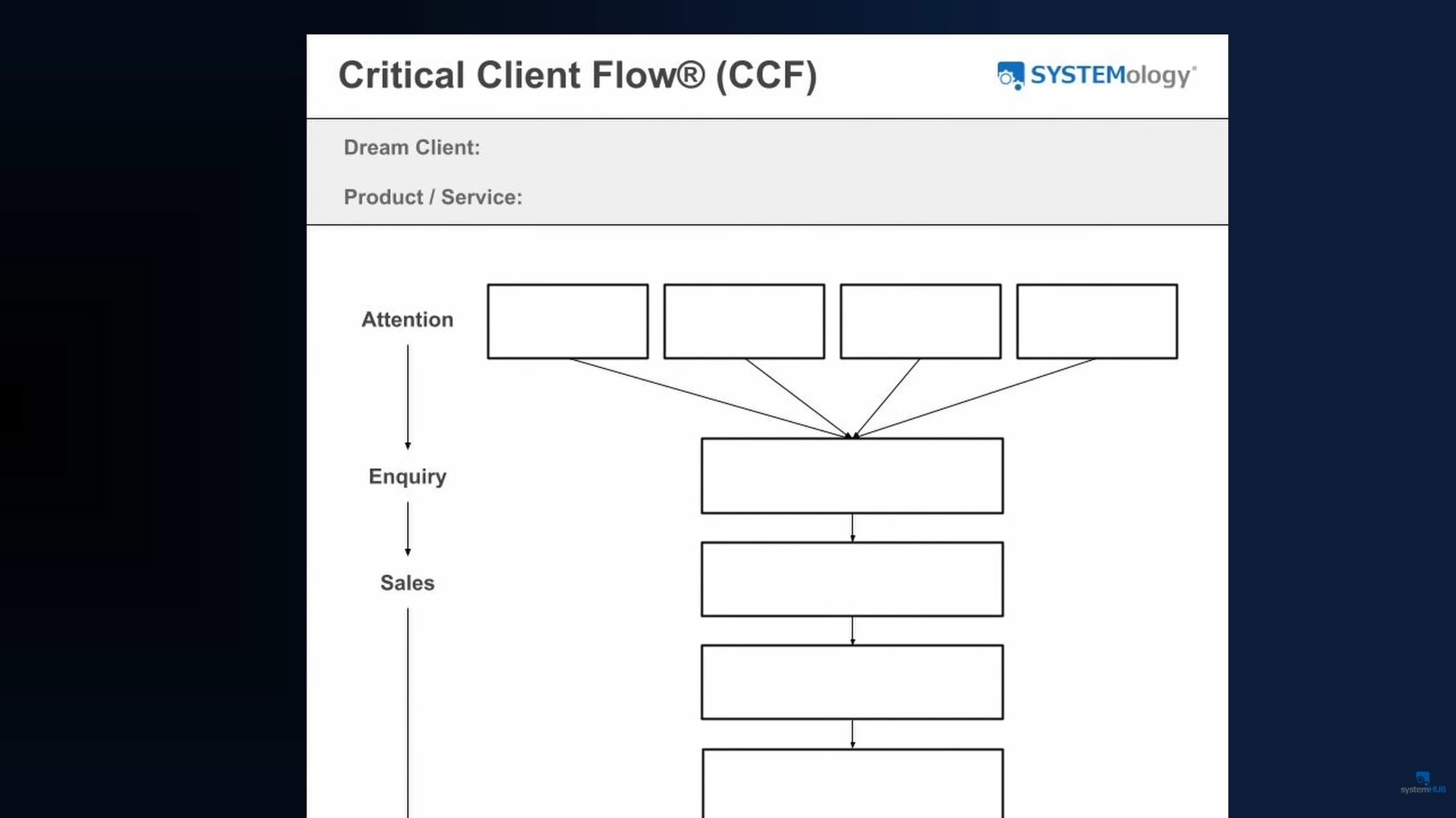
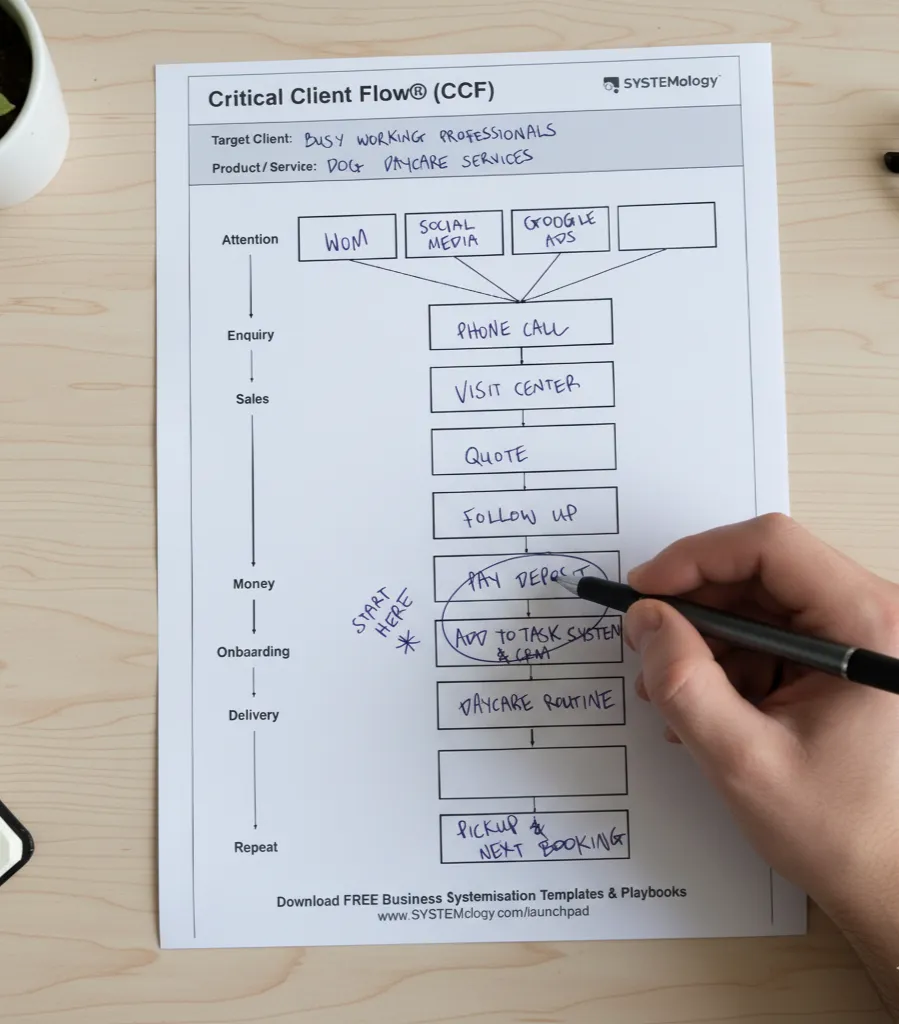
In the SYSTEMology methodology, this one-page map is called the Critical Client Flow (CCF). It captures the linear journey that a prospect and then a client goes through to receive your core product or service. Think of it as the backbone of how your business operates.
It is not a traditional process map. There are no diamond-shaped decision nodes, no parallel pathways, no colour-coded swimlanes. It is a simple sequence of boxes, each one labelled with two or three words, flowing from left to right (or top to bottom). The entire thing fits on a single page.
Three rules keep it useful:
- Only capture what you are currently doing. Not what you would like to be doing. Not your ideal future state. Just the reality of how work gets done today. This honesty is what makes the gaps visible.
- Keep it high level. Two or three words per step is all you need. “Clarification call.” “Send quote.” “Onboard client.” You will add detail later when you build out individual SOPs. Right now, the goal is the big picture.
- Do not overthink it. The finished map should have no more than 7 to 12 steps. If you end up with more, combine related steps. If a step is done by the same person in the same sitting, it is probably one step.
Tip: Start with pen and paper or a whiteboard. The goal is speed and clarity, not a polished graphic. You can move it into a digital tool later.
How to Map Your Business Processes in 5 Steps
Here is the process David Jenyns uses when he walks business owners through this exercise. It takes about 20 minutes and works for any industry.
Step 1: Pick One Client and One Product
Before you map anything, get specific. Choose one target client and one primary product or service you sell to that client.
Your target client is your dream client: the one who pays your advertised prices, is a pleasure to deal with, and refers friends and family. Your primary product is the best starting point for that client. Which product opens the door to a long-term relationship?
This feels limiting, but it is actually liberating. You are not shutting down other lines of business. You are creating focus. You cannot map everything on day one, but you can map this.
For example, imagine you run a plumbing business. Your dream clients might be high-end builders. Your primary service is kitchen renovations. That is your starting point.
Step 2: Map the Linear Journey
Now walk through the journey step by step. Ask yourself: what happens first? What happens next? Keep going until the job is complete and (ideally) the client is coming back or referring someone new.
Sticking with the plumbing example, the journey might look like this:
Attention (word of mouth, Google Ads, social media)
Clarification Call (learn about the project, check fit)
Quoting (price up using templates and pre-written components)
Follow-Up (stay on top of the lead until they decide)
Acceptance & Signing (confirm the quote, sign contract, collect deposit)
Onboarding (enter into job management software, order materials, schedule)
Delivery (do the work, hit project milestones)
Inspection & Handover (final walkthrough, deliver to the builder)
Your steps will be different. A bookkeeper might have “initial financial audit” as the core product. A digital agency might have “build a new website.” The structure stays the same: a linear series of stages that your client moves through.
“If you can explain how your business works on the back of a napkin, you’ve found your starting point.”
Step 3: Identify the Problem Areas
Now step back and look at your map. Where do the challenges show up? Where does work stall, get repeated, or depend entirely on you?
Colour-code the painful areas red. These are your priority zones. Common red spots include:
The handover from sales to operations (details get lost, expectations get misaligned). Quoting (slow turnaround, inconsistent pricing). Client onboarding (poor expectation-setting leads to scope creep and micromanagement).
By capturing only what you are actually doing, the holes become immediately visible. If you have trouble generating consistent leads, you probably do not have a reliable attention system. If cash flow is tight, your invoicing process might be the culprit. The map tells the story.
Step 4: Assign Each Box a System
Each box on your map will eventually become a documented system: a standard operating procedure (SOP) that any team member can follow. You do not need to write them all today. Start with the red ones.
If you need a starting point for structure and formatting, systemHUB’s free SOP templates give you a ready-made framework so you are not staring at a blank page.
Tip: Pick your single most painful red zone and document that process first. One finished system is worth more than ten half-started ones.
Step 5: Track Your Progress
As each system gets documented and tested, change the colour of that box from red to green. This simple scoreboard gives the whole team a visual snapshot of where the business stands.
There is something deeply satisfying about watching those red boxes turn green, one at a time. Some teams turn it into a friendly competition between departments. The point is momentum: every green box means one fewer thing that depends on you.
How much are those red zones actually costing you?
Every bottleneck you just identified has a dollar figure attached to it. Rework, delays, lost leads, wasted hours. The free Cost of Chaos Calculator lets you see exactly what undocumented processes are doing to your bottom line.
Real Results From Mapping Business Processes
This is not theory. Real business owners have used this exact approach to transform their operations. Here are two of them.
Gary McMahon, Ecosystem Solutions
Gary McMahon founded Ecosystem Solutions, an ecological consulting firm, in 2005. Demand grew quickly, but so did Gary’s workload. He was putting in 100 to 110 hours a week. His health suffered. His family life suffered. The quality of his work suffered.
He tried hiring. He tried training. He tried every tool and course he could find. Nothing worked. Gary was the bottleneck, and he knew it. When he came across the SYSTEMology methodology, he described it as his “only hope.”
The turning point was mapping his business processes using the Critical Client Flow. For the first time, Gary and his team could see the bottlenecks. They used the CCF to onboard new team members, create a consistent brand identity, and systematically work through the red zones.
The result: profitability increased approximately 80 per cent. Gary took his first three-week family holiday in his entire working life. When asked what a systemised business means to him, Gary’s answer was two words: “Peace of mind.”
“It’s like I’ve lost fifty kilos. And I’ve got a life.”
— Gary McMahon, Ecosystem Solutions
Ryan Stannard, Stannard Family Homes
Ryan Stannard started as a carpenter and built Stannard Family Homes into a $15 million custom home operation in Adelaide. But growth came with a cost: Ryan was stuck answering every question, every day. He could not step away.
His solution was to map the processes, write them down, and effectively “clone himself.” His daughter Eryn joined the business in an interior design role and quickly became the Systems Champion. She did not just follow the systems. She questioned, rebuilt, and improved them. Within six months, she had rewritten the interior design processes and was handling 12 client selections at once.
Eryn eventually rose from interior design to assistant manager. She now knows, in Ryan’s words, “every intricate bit of the business” because she has been rewriting the systems manual. Ryan takes seven-week holidays while the business runs without him.
As Ryan puts it: “You just got to write it down.”
Read more stories like these on the SYSTEMology client stories page.

Want the full framework behind what Gary and Ryan used?
The SYSTEMology book walks you through all seven stages of building a systemised business, from mapping your processes to removing key person dependency for good. It is the complete playbook.
What to Do After You’ve Mapped Your Processes
You have the map. Now what? Three moves will turn that one-page diagram into real operational change.
First, document your most painful process. Pick the red zone that costs you the most time, money, or stress. Write out the steps so that someone else could follow them without asking you a question. Keep it simple. A short video walkthrough or a numbered checklist is enough to start.
Second, assign someone to own the project. In SYSTEMology, this person is called the Systems Champion. They do not need to be a process expert. They need to be organised, curious, and willing to ask questions. The business owner is typically the worst person to write the documentation because they are too close to the work and too busy doing it.
Third, store your systems where the team actually works. A system buried in a shared drive that nobody checks is a system that does not exist. Tools like systemHUB let you link each documented process directly to the task where the work gets done. When a team member opens a task, the step-by-step instructions are right there.
The long-term goal is to deliver your core product or service without key person dependency. Each green box on your map is a step closer to a business that runs without you holding every piece together. For the full seven-stage methodology, see the SYSTEMology process overview.
Where does your business sit on the systemisation scale?
You have mapped your processes and started identifying the gaps. The free System Strength Test gives you a quick score across the key areas of your business so you know exactly what to tackle next.
Where to Start Today
Mapping your business processes does not require complex software, a dedicated ops team, or months of planning. It starts with one client, one product, one journey, and about 20 minutes of honest thinking.
Grab a whiteboard marker, a pen and notepad, or open the Critical Client Flow template inside systemHUB. Walk through the journey your client takes from the moment they first hear about you to the moment you deliver the finished product. Label each stage. Colour the painful parts red.
That is your map. That is your action plan. And that is the single fastest way to stop being the bottleneck in your own business.

“Once you get it all onto one page, suddenly the chaos starts to make sense.”
Ready to build your one-page map right now?
systemHUB has the Critical Client Flow template loaded and ready to go. Sign up for a free trial, duplicate the template into your account, and start mapping your business in minutes. Built-in AI assistants can even help you document each process once you have identified it.
FAQ
How many processes does a small business need to document?
Focus on the critical few. Most businesses have 7 to 12 core processes that deliver their primary product or service. The 80/20 rule applies: a small number of well-documented systems will produce the majority of your efficiency wins. You do not need hundreds of SOPs to see results.
What is a Critical Client Flow?
A Critical Client Flow (CCF) is a tool from the SYSTEMology methodology that maps the linear journey your client goes through, from first contact to delivery of your core product. It identifies the minimum viable systems your business needs to operate without depending on any single person.
How long does it take to map your business processes?
The initial one-page map takes about 20 minutes. Documenting each individual process as a full SOP takes longer, but you do it one system at a time. Most business owners complete their first documented process within a week of mapping.
What is the difference between a process map and a client journey?
A client journey focuses on the customer’s experience and how they feel at each touchpoint. A business process map like the CCF also includes the internal steps required to deliver the product, such as onboarding into project management software, ordering materials, and internal handovers between teams.
Do I need special software to map my business processes?
No. You can start with a whiteboard, pen and paper, or a free template. A dedicated platform like systemHUB becomes useful when you are ready to store, share, and track your documented systems in one place. But the mapping step itself needs nothing more than something to write on.
Who should be responsible for documenting business processes?
Ideally, a dedicated team member who is organised, curious, and willing to learn. In SYSTEMology, this role is called the Systems Champion. The business owner is typically the worst person to write the documentation. They are too close to the work, too busy, and tend to skip steps they consider “obvious” but that the rest of the team needs spelled out.
What if my business is too unique or complex for a simple process map?
Every business has a core journey it follows to deliver value to clients. David Jenyns has guided hundreds of businesses through this exercise across dozens of industries and has never found one where the one-page map could not be created. If your first attempt has more than 12 steps, combine related stages. If it feels too simple, that is a good sign. You can always add detail later when you document each step as a full SOP.